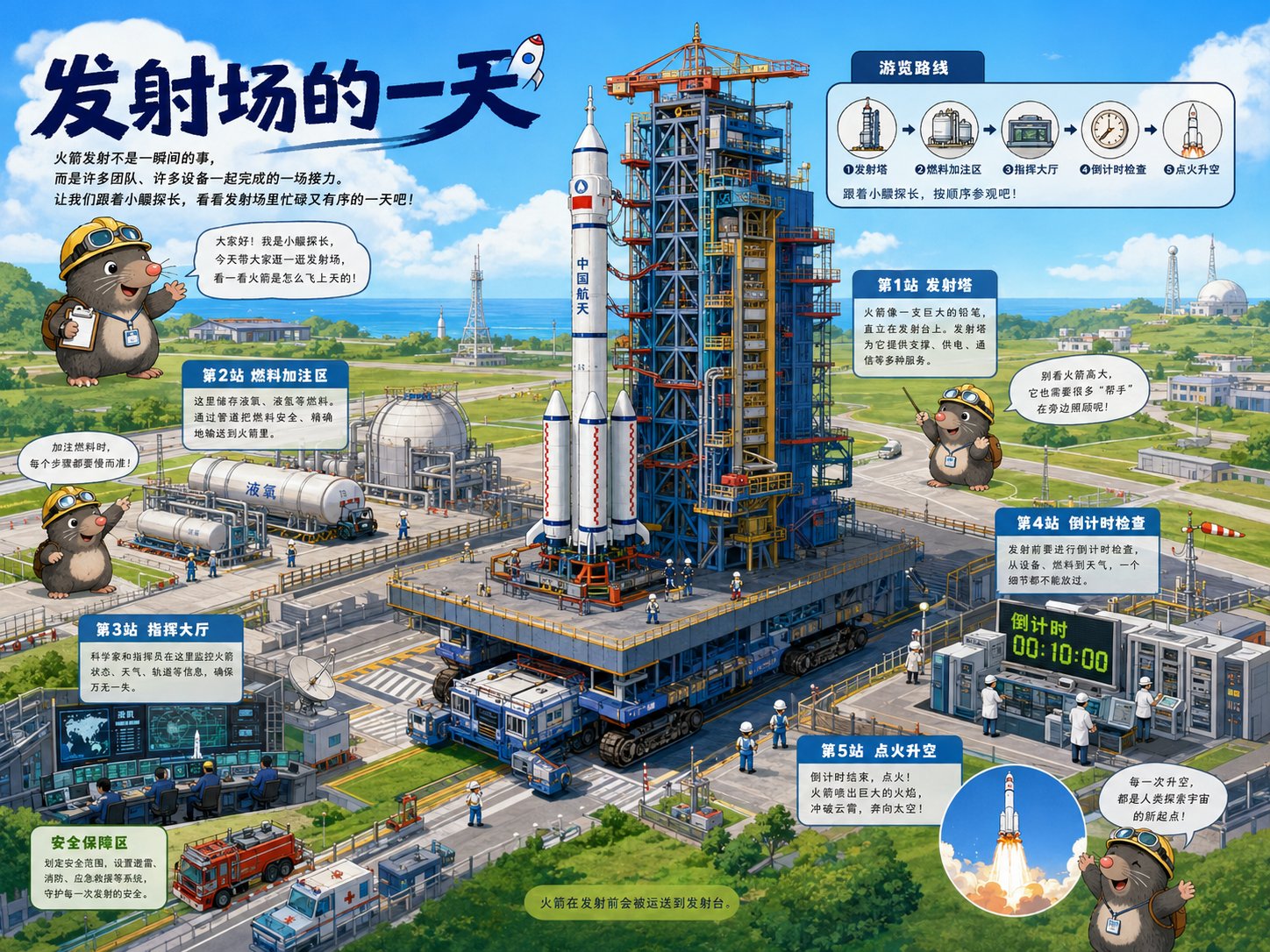
《导览式科普绘本》提示词: 请根据【主题】创作一张高完成度的「导览式科普绘本」风格插画。 这是一张结合“大型场景主视觉 + 导览路线 + 可爱导览 IP + 知识站点 + 儿童科普绘本质感”的场景导览式科普图解页。画面需要让观者像被带着参观一个复杂系统一样,边看边理解主题背后的运行逻辑、空间结构、流程关系和关键知识点。 【基础设定】 主题:【填写主题,例如发射场的一天 / 一个集装箱的旅行 / 地铁站里的秘密路线 / 下潜到深海的一小时 / 机场如何运转 / 医院急诊系统 / 智慧农场 / 消防站出警流程】 画幅比例:【4:3 横版】 主色调:【根据主题自动匹配,整体保持明亮、清爽、儿童友好】 风格方向:【现代儿童科普绘本 / 场景导览式图解 / 高完成度数字插画】 【核心表达】 请围绕【主题】设计一个完整的大型场景或复杂系统。画面中必须有一个明确的主视觉场景,例如大型设施、交通系统、科技装备、自然探索场景、城市公共系统或生产流程。主体要足够清晰、有规模感、有细节,能够成为第一眼的视觉中心。 画面要通过“导览路线”的方式组织信息,避免仅把场景做成静态陈列。请设计一条清晰的参观路线、流程路线、时间线或空间动线,让读者可以沿着路线一步步理解这个系统是如何运行的。 【导览 IP 设计】 请为本图设计一个原创、可爱、亲和的导览小 IP。导览 IP 可以是小动物、小朋友、拟人化工具或其他适合主题的原创形象,但必须具有独立原创性,不要照搬任何参考图中的角色、动物形象、服装、配色或搭档关系。 导览 IP 的作用是: 1. 开场介绍主题 2. 指向关键知识点 3. 引导读者顺着路线阅读 4. 增加儿童绘本的陪伴感和趣味性 导览 IP 可以在画面中出现 2-3 次,但不要过度抢主视觉。角色应圆润、可爱、有表情、有动作,适合儿童科普绘本。 【信息结构】 画面中请设置 3-6 个“知识站点”,每个站点用简短中文标签和短说明表达。站点命名可以采用: - 第1站|xxx - 第2站|xxx - 重点观察|xxx - 小知识|xxx - 为什么|xxx - 如何工作|xxx 每个知识点都要围绕主题的核心运行逻辑展开,不要写空泛说明。文字要短、清楚、自然,避免长段落,适合儿童阅读。 【画面模块】 整张图建议包含以下模块: 1. 顶部主标题区:清楚写出主题名称 2. 开场导览区:导览 IP 引出主题 3. 大型主场景区:展示主题系统的完整场景 4. 导览路线区:用箭头、虚线、路径、时间节点或流程线串联知识点 5. 知识站点区:用小信息框、导览牌、局部标注展示关键知识 6. 小百科 / 小贴士区:补充一个有趣知识 7. 收尾区:让导览 IP 做简短总结或引导 【构图要求】 画面采用 4:3 横版构图,整体像一本高质量儿童科普绘本的跨页,也像一张儿童科技馆导览图。画面需要有清晰的视觉重心:大型主场景占据主要空间,导览路线贯穿画面,知识模块自然分布在周围。信息丰富但不能杂乱,阅读路径要顺畅。 【视觉风格】 整体采用现代儿童科普绘本风格: - 明亮、清爽、干净的色彩 - 清晰自然的手绘线条 - 高完成度数字插画质感 - 细节丰富但有秩序 - 可爱但不低幼 - 有科普图解感 - 有导览地图感 - 场景真实可信,但表达方式亲和 【文字与标注】 文字以中文为主,使用短标题、短标签、简短说明。不要生成大段复杂文字。信息框应像儿童科普书中的导览牌、知识卡片或小贴士。文字要尽量清晰、简洁、可读。 【最终目标】 让整张图像一页高质量的儿童科普绘本:孩子第一眼被可爱角色和大场景吸引,第二眼能顺着路线读懂系统如何运行,第三眼还能继续发现细节和知识点。画面要具有系列化潜力,方便后续替换不同主题继续创作同类型图片。
 查看原图
原始提示词
《导览式科普绘本》提示词: 请根据【主题】创作一张高完成度的「导览式科普绘本」风格插画。 这是一张结合“大型场景主视觉 + 导览路线 + 可爱导览 IP + 知识站点 + 儿童科普绘本质感”的场景导览式科普图解页。画面需要让观者像被带着参观一个复杂系统一样,边看边理解主题背后的运行逻辑、空间结构、流程关系和关键知识点。 【基础设定】 主题:【填写主题,例如发射场的一天 / 一个集装箱的旅行 / 地铁站里的秘密路线 / 下潜到深海的一小时 / 机场如何运转 / 医院急诊系统 / 智慧农场 / 消防站出警流程】 画幅比例:【4:3 横版】 主色调:【根据主题自动匹配,整体保持明亮、清爽、儿童友好】 风格方向:【现代儿童科普绘本 / 场景导览式图解 / 高完成度数字插画】 【核心表达】 请围绕【主题】设计一个完整的大型场景或复杂系统。画面中必须有一个明确的主视觉场景,例如大型设施、交通系统、科技装备、自然探索场景、城市公共系统或生产流程。主体要足够清晰、有规模感、有细节,能够成为第一眼的视觉中心。 画面要通过“导览路线”的方式组织信息,避免仅把场景做成静态陈列。请设计一条清晰的参观路线、流程路线、时间线或空间动线,让读者可以沿着路线一步步理解这个系统是如何运行的。 【导览 IP 设计】 请为本图设计一个原创、可爱、亲和的导览小 IP。导览 IP 可以是小动物、小朋友、拟人化工具或其他适合主题的原创形象,但必须具有独立原创性,不要照搬任何参考图中的角色、动物形象、服装、配色或搭档关系。 导览 IP 的作用是: 1. 开场介绍主题 2. 指向关键知识点 3. 引导读者顺着路线阅读 4. 增加儿童绘本的陪伴感和趣味性 导览 IP 可以在画面中出现 2-3 次,但不要过度抢主视觉。角色应圆润、可爱、有表情、有动作,适合儿童科普绘本。 【信息结构】 画面中请设置 3-6 个“知识站点”,每个站点用简短中文标签和短说明表达。站点命名可以采用: - 第1站|xxx - 第2站|xxx - 重点观察|xxx - 小知识|xxx - 为什么|xxx - 如何工作|xxx 每个知识点都要围绕主题的核心运行逻辑展开,不要写空泛说明。文字要短、清楚、自然,避免长段落,适合儿童阅读。 【画面模块】 整张图建议包含以下模块: 1. 顶部主标题区:清楚写出主题名称 2. 开场导览区:导览 IP 引出主题 3. 大型主场景区:展示主题系统的完整场景 4. 导览路线区:用箭头、虚线、路径、时间节点或流程线串联知识点 5. 知识站点区:用小信息框、导览牌、局部标注展示关键知识 6. 小百科 / 小贴士区:补充一个有趣知识 7. 收尾区:让导览 IP 做简短总结或引导 【构图要求】 画面采用 4:3 横版构图,整体像一本高质量儿童科普绘本的跨页,也像一张儿童科技馆导览图。画面需要有清晰的视觉重心:大型主场景占据主要空间,导览路线贯穿画面,知识模块自然分布在周围。信息丰富但不能杂乱,阅读路径要顺畅。 【视觉风格】 整体采用现代儿童科普绘本风格: - 明亮、清爽、干净的色彩 - 清晰自然的手绘线条 - 高完成度数字插画质感 - 细节丰富但有秩序 - 可爱但不低幼 - 有科普图解感 - 有导览地图感 - 场景真实可信,但表达方式亲和 【文字与标注】 文字以中文为主,使用短标题、短标签、简短说明。不要生成大段复杂文字。信息框应像儿童科普书中的导览牌、知识卡片或小贴士。文字要尽量清晰、简洁、可读。 【最终目标】 让整张图像一页高质量的儿童科普绘本:孩子第一眼被可爱角色和大场景吸引,第二眼能顺着路线读懂系统如何运行,第三眼还能继续发现细节和知识点。画面要具有系列化潜力,方便后续替换不同主题继续创作同类型图片。
以上为来源页所载提示词,可选中文本复制。本站译文与解读在下方单独列出。
中英对照
本条译文由自动翻译生成,可与原文对照使用。
"Guided Science Picture Book" prompt word: Please create a highly complete 「导览式科普绘本」 style illustration based on 【主题】. This is a scene-guided science illustration page combined with “大型场景主视觉 + 导览路线 + 可爱导览 IP + 知识站点 + 儿童科普绘本质感”. The picture needs to make the viewer feel like being taken on a tour of a complex system, allowing them to understand the operating logic, spatial structure, process relationships and key knowledge points behind the theme. 【基础设定】 Subject: 【填写主题,例如发射场的一天 / 一个集装箱的旅行 / 地铁站里的秘密路线 / 下潜到深海的一小时 / 机场如何运转 / 医院急诊系统 / 智慧农场 / 消防站出警流程】 Aspect ratio: 【4:3 横版】 Main color: 【根据主题自动匹配,整体保持明亮、清爽、儿童友好】 Style direction: 【现代儿童科普绘本 / 场景导览式图解 / 高完成度数字插画】 【核心表达】 Please design a complete large-scale scene or complex system around 【主题】. There must be a clear main visual scene in the picture, such as large facilities, transportation systems, technological equipment, natural exploration scenes, urban public systems or production processes. The subject should be clear enough, have a sense of scale, and have details, so that it can become the center of vision at first glance. The screen should organize information in the “导览路线” format to avoid just making the scene a static display. Please design a clear tour route, process route, timeline or spatial movement line so that readers can understand how the system operates step by step along the route. 【导览 IP 设计】 Please design an original, cute and friendly tour guide IP for this picture. The guide IP can be an original image of a small animal, child, anthropomorphic tool or other theme-appropriate one, but it must be independent and original, and do not copy the characters, animal images, costumes, colors or partnerships in any reference pictures. The function of navigation IP is: 1 . Opening introduction theme 2 . Point to key knowledge points 3 . Guide readers to read along the route 4 . Increase the companionship and interest of children's picture books Navigation IP can appear 2 - 3 times in the screen, but do not overly occupy the main visual. The characters should be round, cute, expressive, and action-packed, making them suitable for children's popular science picture books. 【信息结构】 Include 3–6 knowledge stations in the image. Each site should be expressed with a short Chinese label and short description. The site naming can be: - 第1站|xxx - 第2站|xxx - 重点观察|xxx - 小知识|xxx - 为什么|xxx - 如何工作|xxx Each knowledge point should be centered around the core operating logic of the topic, and do not write empty explanations. The text should be short, clear, and natural, avoid long paragraphs, and be suitable for children to read. 【画面模块】 The entire picture is recommended to include the following modules: 1 . Main title area at the top: clearly write the topic name 2 . Opening navigation area: Navigation IP Leading to the topic 3 . Large main scene area: showing the complete scene of the theme system 4 . Navigation route area: use arrows, dotted lines, paths, time nodes or flow lines to connect knowledge points 5 . Knowledge site area: use small information boxes, navigation boards, and local annotations to display key knowledge 6 . Encyclopedia / Tips area: add an interesting knowledge 7 . Closing area: Let the tour guide IP give a brief summary or guide 【构图要求】 The picture adopts 4:3 horizontal layout composition, and the whole picture looks like a double-page spread of a high-quality children's science picture book, or a navigation map of a children's science and technology museum. The picture needs to have a clear visual focus: the large main scene occupies the main space, the navigation route runs through the picture, and the knowledge modules are naturally distributed around it. The information is rich but not cluttered, and the reading path should be smooth. 【视觉风格】 The whole style adopts the style of modern children's popular science picture books: - Bright, refreshing, clean colors - Clear and natural hand-drawn lines - Highly finished digital illustration texture - Detailed but orderly - Cute but not childish - Has a sense of popular science illustration - A sense of navigation map - The scene is real and believable, but the expression is friendly 【文字与标注】 The text is mainly in Chinese, using short titles, short tags, and short descriptions. Don't generate large blocks of complex text. The information box should be like a guide board, knowledge card or tips in a children's science book. The text should be as clear, concise, and readable as possible. 【最终目标】 Make the whole image a page of high-quality children's science picture books: children are attracted by the cute characters and big scenes at the first glance, and can follow the route to understand how the system operates at the second glance. At the third glance, they can continue to discover details and knowledge points. The pictures should have the potential to be serialized, so that they can be replaced with different themes and continue to create the same type of pictures.