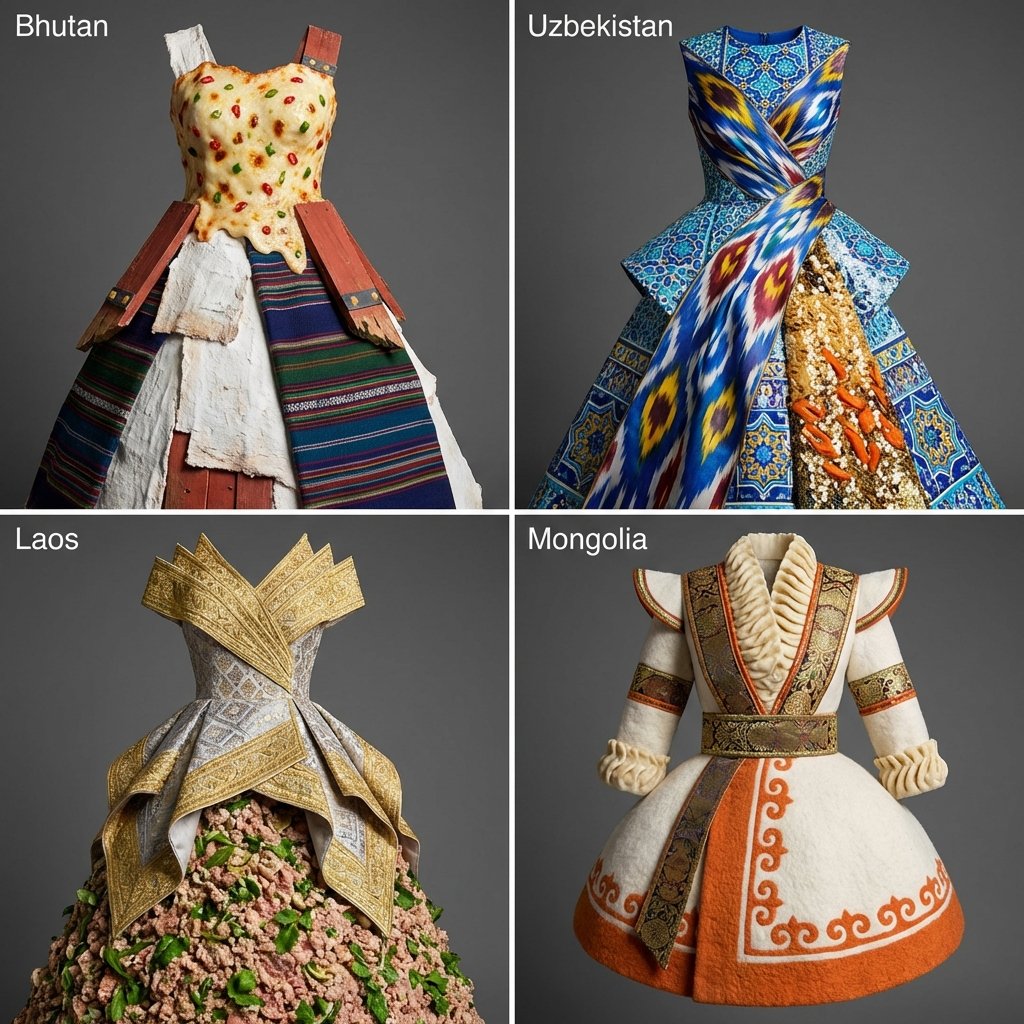
四国文化锚点服装设计宫格查看原图
四国文化锚点服装设计宫格图片作品 / 1024 × 1024
作者与来源

@Gdgtify

来源图库归入 GPT-Image2;未取得逐条生成 API 模型记录。原文保留来源公开内容,未独立核验是否为作者最初使用的提示词。

01

原始提示词

英文 · 来源页原文

<instructions> input: continent pick 4 lesser known countries in that continent function drawx($lesser known country){ > Anchor 1: "$lesser known's famous architecture" (it's texture, material and color) > Anchor 2: "$lesser known's famous fashion " (it's texture, material and color) > Anchor 3: "$lesser known's famous food " (it's texture, material and color) > > **Instruction:** Render a dress design that exists at the exact center of this triangle. } output: 2x2 grid, drawx( for each lesser known country)

以上为来源页所载提示词,可选中文本复制。本站译文与解读在下方单独列出。

02

中英对照

原文与本站译文

本条译文由自动翻译生成,可与原文对照使用。

中文ZH · 自动译文

<instructions> 输入:大陆 选择 4 该大陆中不太知名的国家 函数drawx($不太知名的国家){ > 锚点 1 : "$lesser known's famous architecture" (它的纹理、材质和颜色) > 锚点 2 : "$lesser known's famous fashion "(它的纹理、材质和颜色) > 锚点 3 : "$lesser known's famous food "(它的纹理、材质和颜色) > > **说明:** 渲染存在于该三角形正中心的服装设计。 } 输出:2x2 网格,drawx(对于每个不太知名的国家)
EnglishEN · Original language

<instructions> input: continent pick 4 lesser known countries in that continent function drawx($lesser known country){ > Anchor 1: "$lesser known's famous architecture" (it's texture, material and color) > Anchor 2: "$lesser known's famous fashion " (it's texture, material and color) > Anchor 3: "$lesser known's famous food " (it's texture, material and color) > > **Instruction:** Render a dress design that exists at the exact center of this triangle. } output: 2x2 grid, drawx( for each lesser known country)